Connect with just your SAP endpoint URL and its authentication. No heavy integration project.
URL + auth: all it takes to connect
Daily: SAP → Sellia batches
2-way: scores written back to SAP
Why connect SAP to Sellia
No more exporting ageing reports into spreadsheets. Your SAP data and Sellia’s predictions live side by side, so credit managers act on the right accounts first.
-
1
Very fast set-up
-
2
Every partner on one page
Customer details, credit limits, outstanding, due invoices and blockage, all in one Sellia view.
-
3
Insights back in SAP
Blockage status, limit proposals, payment KPIs, sales potential and bankruptcy risk, written back to SAP.
-
4
One place for credit risk
Scoring, priorities and next-best actions for the whole portfolio, in a single cockpit.
The full picture, one page
Each customer loaded from SAP opens in a single Sellia view: master data and receivables from your ledger, plus Sellia’s scores for what happens next.
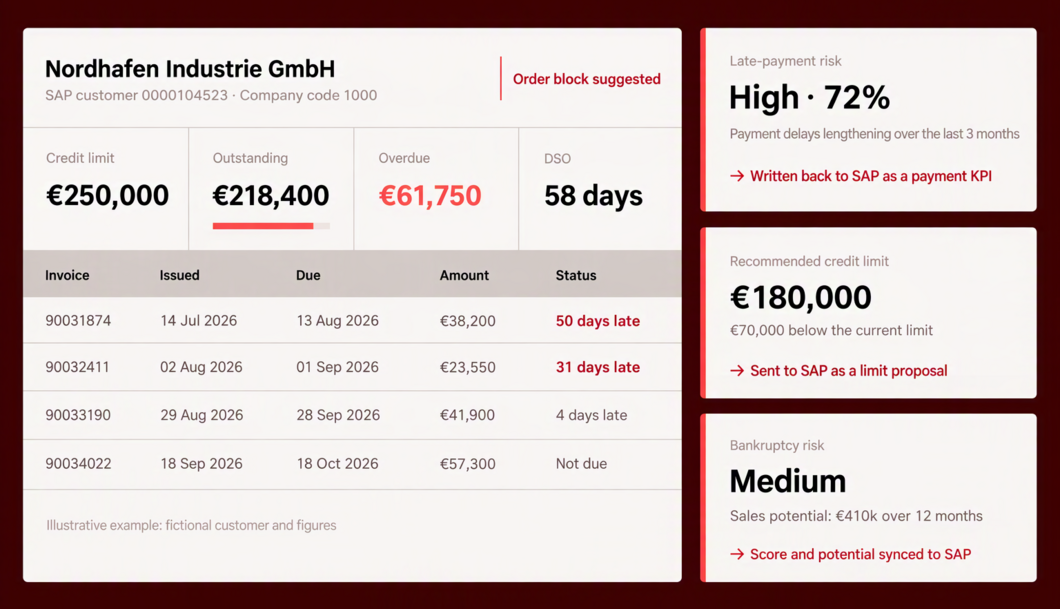
Sellia’s intelligence, inside SAP
Turn on write-back and Sellia’s predictions reach the teams and processes running in SAP, from order entry to dunning.
-
Blockage status
Block or release accounts in SAP according to Sellia’s risk view.
-
Credit limit proposals
Recommended limits sent to SAP for review and approval.
-
Payment behaviour KPIs
Delay trends and payment habits for each customer.
-
Sales potential
Forecast revenue, so credit decisions weigh growth as well as risk.
-
Bankruptcy risk score
Early warning on failure risk, shown next to each partner in SAP.
How it works
A single configuration with the Sellia team and one initial history load. After that, everything runs on its own.
Configure once
With the Sellia team, select the right SAP objects and tables and map any custom fields.
One session
1
Initial history load
A first load of historical A/R, typically the last 2–3 years, so scores learn from real behaviour.
One-off, heavier load
2
Daily batches
New invoices, payments, limits and blocks flow from SAP to Sellia every day, with no manual step.
Every day
3
Sync back to SAP
Turn on write-back to sync blockage status, limits and scores into SAP.
Optional
4
Typical SAP sources mapped at set-up: Customer master, Open & cleared items, Billing documents, Credit management data, Custom fields.
See it on your own SAP data.
Book a demo and we’ll show you how the SAP Connector fits your order-to-cash process: what we load, what we write back and how quickly you can go live.